
Indoor solo
Dance AI video generator
Solo or DuoTurn Photos Intoa Pick It Up Dance Video
One photo for a solo, one group photo (or two individual photos) for a duo, or three of the same person in different outfits. Short vertical 9:16 MP4. 768P is 12 credits; 2K is 20. The original Pick It Up Dance meme is a 12-second clip.
768P 12 credits · 2K 20 credits · 12s · 9:16
Solo dance
Outdoor duo
One person · different outfits
01 · Create your video
Put your photo in the dance
Choose one photo for a solo, one group photo (or two individual photos) for a duo, or three outfit photos of the same person. This visit has no free clip — pay, then the video is generated on the account for your email.
Indoor solo12 sec · 9:16 · MiniMax H3
1
Add one photo — you
Front-facing, well-lit full-body or three-quarter photos work best. One face per photo.
Tip: drag photos onto the boxes, or paste one with Ctrl+V (⌘V).
Photo on your phone?
2
Pick the template
Photos are checked for safety before generation. If a photo is rejected, generation will not start and credits are not used.
Your photo is used to render this clip. Nothing you upload is published. See the privacy policy for how long files are kept. Privacy policy
03
Export quality
12 sec · 9:16 · MiniMax H3
Your balance
—
This generation
12 cr
Human verification is not configured yet.
Failed or blocked generations return all reserved credits.
Credits required · Ready in about 7 minutes · Failed renders are never charged.
THE PICK IT UP DANCE FORMAT
What is Pick It Up Dance Video?
Pick It Up Dance Video turns your photos into a short vertical dance performance. Choose a template, upload the people, and let the model animate the clip.
It is a photo-to-dance video format built for Pick It Up: one clear photo for a solo, one group photo or two individual photos for a duo, or three photos of the same person in different outfits.
No filming, choreography, or editing is required. The model keeps the people recognizable, follows the selected movement, and renders a 12-second 9:16 video for TikTok, Reels, and Shorts — the same length as the original Pick It Up Dance meme.
Every generation is a new take. Watch the faces, hands, outfits, timing, and audio before you share it.
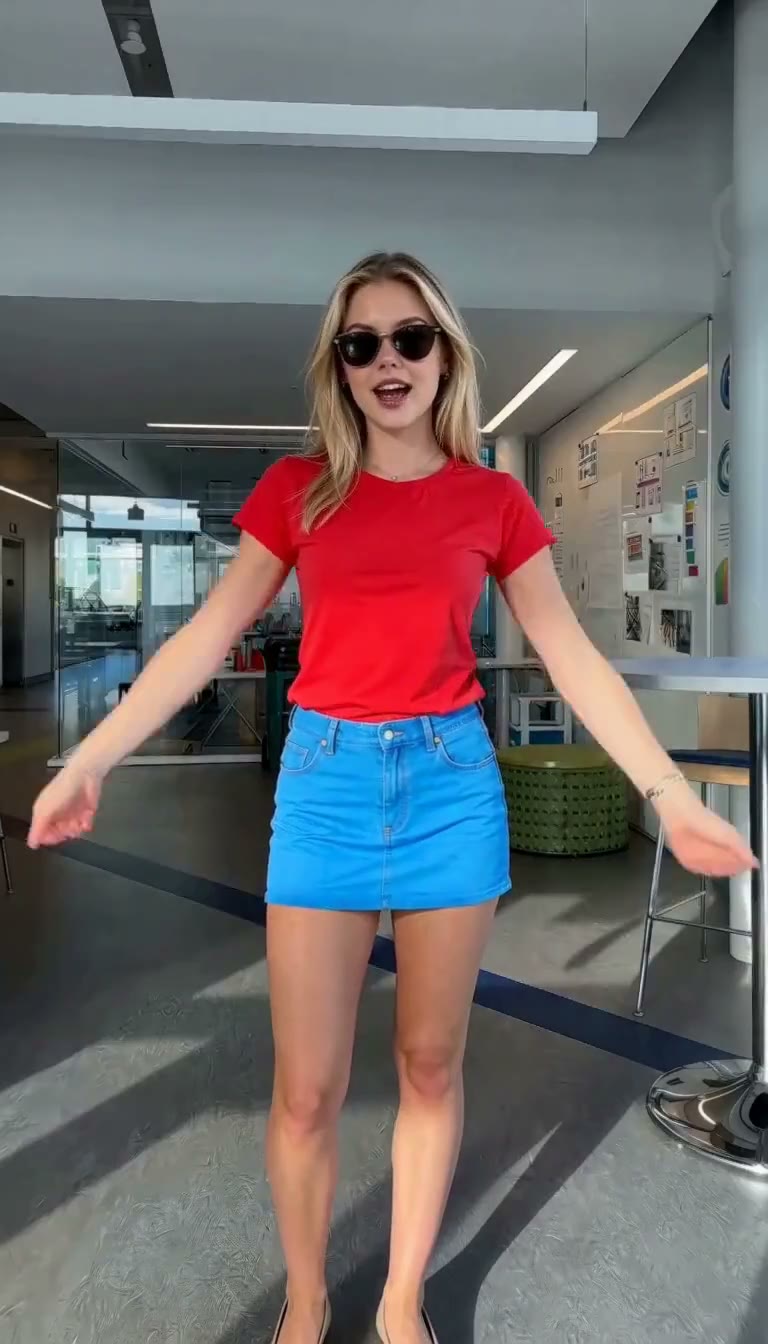 Template 1 · Indoor solo
PICK IT UP DANCE WORKFLOW
Three moves. One finished dance video.
Upload the right photo
Use one clear photo for a solo, one group photo or two individual photos for a duo, or three looks for an outfit change.
Pick a template
Choose Indoor solo, Outdoor duo, or One person · different outfits. Each template sets the scene and the required photo slots.
Generate and download
Generate, review, and download. 768P is 12 credits and 2K is 20. Failed renders are not charged. Keep the finished clip in your library.
IDEAS
Make a Pick It Up Dance Video with anyone
Best friends
Turn years of inside jokes into one dance performance — even if you have not been in the same room for months.
Couples
Make a duet with your partner and turn an anniversary, trip, or everyday moment into a clip.
Birthday surprises
Put the birthday person in a dance with their best friend and make an instant party opener.
Group-chat legends
Pick the two least likely dancers in the chat and watch their replies roll in.
EVERY TEMPLATE
Pick what you want to make
Each template opens the studio with the right photo slots. Choose a look, then add your photos.
9:16
9:16
9:16
9:16
Frequently Asked Questions
01What does one clip cost?
768P is 12 credits and 2K is 20. Packs start at $4.90 for one clip, $9.90 for three, $12.90 for five, and $19.90 for ten. See pricing. A failed or blocked render is not charged.
02How long does one clip take?
Usually about 7 minutes. Keep the tab open while it renders.
03Where is my video history?
Signed-in clips land in Library and in the studio history. Closing the wait does not cancel a job the generator has already accepted.
04Do I need to write a prompt?
No. Choose Indoor solo, Outdoor duo, or One person · different outfits, then upload the requested photos. The template supplies the dance direction.
05Can I use a famous song?
Use only audio and photos you have the right to use. We do not grant a music license for a famous recording; platforms may mute or remove unlicensed audio.
06Can I use the clip commercially?
Only if you have the required rights and permission for the photos, people, and audio. Do not use someone’s likeness to mislead people or advertise without permission.
07Why not use a generic AI video generator?
Pick It Up Dance Video is organized around ready-to-use dance templates: indoor solo, outdoor duo, and outfit change. You choose the input format instead of writing a long prompt.
08What is Pick It Up Dance Video?
It is a short photo-to-dance video format. Upload one photo for a solo, one group photo or two individual photos for a duo, or three photos of the same person in different outfits.
09How do I make a video?
Open the generator, choose a template, upload the required photo or photos, confirm the rights checks, and generate. Sharp, front-facing images help.
10What does the clip keep?
Output is a 12-second 9:16 H.264 MP4 (matching the original Pick It Up Dance meme). The model tries to follow your faces, bodies, outfits, and movement; hands and timing can still drift. Watch the file before you share it.
11What photos should I use?
Use clear, front-facing photos with even light. Solo needs one person; the duo group mode needs both people visible; outfit change needs three photos of the same person. See the photo guide.
12How long are files kept?
Finished clips can be downloaded for seven days. Source photo binaries are cleaned up after completion, failure, or expiry, with a target retention of up to 24 hours. Failed or blocked jobs return reserved credits.
Pick It Up Dance Video generator
Turn your photos into a Pick It Up Dance Video.
Rights check
Use only photos you have the right to use.
No public figures, minors, misleading impersonation, or copyrighted characters.